

Creating an AI influencer is not a one-prompt exercise. The difficult part is keeping one recognizable person consistent across images, short videos, captions, and weeks of publishing. This guide focuses on that production problem: define the character, build a reusable reference set, generate repeatable images, animate only the strongest frames, disclose synthetic media, and improve the system using real audience signals.
You do not need to train a model on day one or buy a large stack of subscriptions. A reference-based workflow is enough to test the concept. Move to a LoRA or a more technical ComfyUI workflow only when the character and content direction are already working.
Quick verdict
Start with one adult character, one audience promise, 8–12 approved reference images, and one repeatable image workflow. Publish a small SFW test series before adding video, paid platforms, or advanced training. Consistency and disclosure matter more than generating a large volume of images.
Key Takeaways
- Lock identity traits separately from changeable scene details so the character remains recognizable without repeating the same image.
- Use a reference-first workflow before training a LoRA; training cannot rescue a weak character concept or inconsistent source set.
- Create still images first and animate only approved frames. Image-to-video tools amplify facial, hand, and clothing errors.
- Keep a reproducibility log with the model, workflow version, seed, reference image, aspect ratio, and final edit notes.
- Label realistic AI media and review the current rules of every social or subscription platform before publishing.
- Measure saves, profile visits, completion rate, and repeat viewers before treating follower count or revenue as proof of product-market fit.
AI Influencer Workflow at a Glance
The production loop has six stages. Do not automate the later stages until the earlier ones produce dependable results.
- Production Route
- Hosted generator
- Best For
- Fast concept testing
- Main Advantage
- Minimal installation and a short learning curve
- Trade-off
- Less workflow control; credits and policy limits can change
- Production Route
- Local ComfyUI
- Best For
- Repeatability and deeper control
- Main Advantage
- Reusable workflow JSON, model choice, and precise inputs
- Trade-off
- Requires compatible hardware or paid cloud compute
- Production Route
- Hybrid
- Best For
- Most solo creators
- Main Advantage
- Local/reference image control with hosted video and editing
- Trade-off
- More files and versions to manage
| Production Route | Best For | Main Advantage | Trade-off |
|---|---|---|---|
| Hosted generator | Fast concept testing | Minimal installation and a short learning curve | Less workflow control; credits and policy limits can change |
| Local ComfyUI | Repeatability and deeper control | Reusable workflow JSON, model choice, and precise inputs | Requires compatible hardware or paid cloud compute |
| Hybrid | Most solo creators | Local/reference image control with hosted video and editing | More files and versions to manage |
Choose the Character Before You Choose the Tools
Define one audience promise
A visual character is not a niche. “Realistic woman” or “anime creator” describes an appearance, not a reason to follow. Write one sentence that explains what the audience receives: compact fitness explainers, fictional travel diaries, gaming commentary, fashion lookbooks, or a clearly disclosed virtual companion persona.
Keep the first concept narrow enough to produce repeatedly. A character who changes from luxury travel to crypto commentary to adult promotion in the same week will be difficult for both viewers and recommendation systems to understand.
Write a one-page character sheet
- Identity: stage name, unmistakably adult age, face shape, eye color, hair, build, and two memorable visual markers.
- Voice: vocabulary, sentence length, sense of humor, subjects the character will not discuss, and disclosure language.
- World: occupation or role, recurring locations, three content pillars, and the visual mood.
- Boundaries: no real-person likeness without permission, no ambiguous age presentation, no deceptive endorsements, and no private information.
- Keep Locked
- Face proportions, eye color, hairline, signature marker
- Change Between Posts
- Outfit, pose, background, crop
- Avoid
- Changing several identity traits in one generation
- Keep Locked
- Age presentation and body proportions
- Change Between Posts
- Lighting, camera angle, activity
- Avoid
- Age-ambiguous styling or prompts
- Keep Locked
- Voice, values, and disclosure language
- Change Between Posts
- Topic, hook, caption format
- Avoid
- Copying a real creator's identity or endorsement
| Keep Locked | Change Between Posts | Avoid |
|---|---|---|
| Face proportions, eye color, hairline, signature marker | Outfit, pose, background, crop | Changing several identity traits in one generation |
| Age presentation and body proportions | Lighting, camera angle, activity | Age-ambiguous styling or prompts |
| Voice, values, and disclosure language | Topic, hook, caption format | Copying a real creator's identity or endorsement |
Use an identity prompt, not a giant scene prompt
Save a short identity block that can be reused unchanged. Put the outfit, location, action, camera, and lighting in separate blocks so you can identify which variable caused drift.
IDENTITY — fictional adult woman, age 28; oval face; dark almond-shaped eyes; chin-length black bob; small silver eyebrow piercing; athletic build.
STYLE — realistic editorial photography; natural skin texture; restrained color grade.
SCENE — [location and activity].
CAMERA — [shot type, lens feel, angle].
LIGHT — [time of day and light direction].
AVOID — real public figure likeness, age ambiguity, plastic skin, asymmetrical eyes, fused fingers, text, logos.
Step 1: Build a Reference Set
Create more candidates than you need, then approve only 8–12 references. The set should show the same identity under controlled variation: a clean headshot, three-quarter views, one profile, mid-length and full-body frames, neutral and smiling expressions, and two lighting conditions.
Reference-set acceptance test
- Test
- Identity
- Pass Standard
- The face is recognizable without the hairstyle
- Reject When
- Eye distance, jaw, nose, or apparent age changes
- Test
- Hands and anatomy
- Pass Standard
- No distracting defects at normal viewing size
- Reject When
- Fused fingers, broken joints, or duplicated features
- Test
- Source rights
- Pass Standard
- Inputs are original, licensed, or used with explicit consent
- Reject When
- A celebrity, private person, or scraped creator is identifiable
- Test
- Range
- Pass Standard
- Angles and expressions vary while identity stays stable
- Reject When
- The set contains near-duplicates only
| Test | Pass Standard | Reject When |
|---|---|---|
| Identity | The face is recognizable without the hairstyle | Eye distance, jaw, nose, or apparent age changes |
| Hands and anatomy | No distracting defects at normal viewing size | Fused fingers, broken joints, or duplicated features |
| Source rights | Inputs are original, licensed, or used with explicit consent | A celebrity, private person, or scraped creator is identifiable |
| Range | Angles and expressions vary while identity stays stable | The set contains near-duplicates only |
Do not train on a real person without permission
A LoRA or face-reference workflow can reproduce identifying features. Use a fictional identity or documented consent, keep the character unmistakably adult, and discard any output that resembles a real person you did not intend to depict.
Step 2: Lock Identity in the Image Workflow
Start with reference-to-image
Use one approved head-and-shoulders reference, a stable identity prompt, and controlled scene variables. Generate a small grid rather than one image at a time. Score the grid for identity, anatomy, clothing, lighting, and whether the result still looks natural at feed size.
The official ComfyUI documentation explains that workflows can be stored as JSON and loaded from images containing workflow metadata. That makes it possible to reproduce a generation instead of trying to remember a collection of settings. See the first-generation guide and image-to-image workflow documentation.
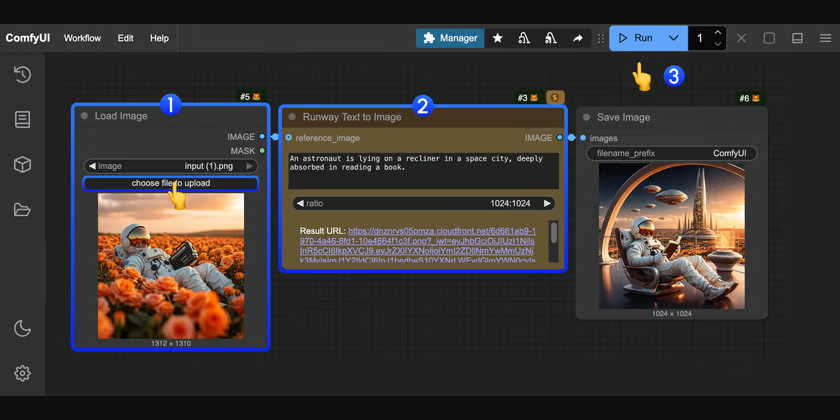
The screenshot above comes from the official ComfyUI Runway reference-to-image example. It demonstrates the useful pattern: load a reference, change the scene prompt, inspect the result, and save the workflow rather than rebuilding it for every post.
Train a LoRA only when references become the bottleneck
A LoRA becomes useful when the character must survive larger changes in pose, distance, clothing, and background. Curate the training set aggressively: consistent identity, varied composition, accurate captions, and no defective images. Keep a holdout set that is not used for training, then compare the trained output against it.
Record every approved generation
- Workflow and model version.
- Reference image or LoRA version.
- Seed and aspect ratio.
- Identity prompt plus scene variables.
- Upscale, retouch, and crop decisions.
- Final filename linked to the published post.
Step 3: Turn Approved Images Into Short Video
Do not ask an image-to-video model to invent a complicated performance. Start with an approved frame and one motion instruction: a slow head turn, a short camera push, fabric moving in wind, or a subtle change in expression. Short, controlled motion is easier to loop and less likely to distort the face.
Use this production order
- Crop the source image to the final vertical or horizontal aspect ratio.
- Remove visible hand or clothing defects before animation.
- Write one motion instruction and one camera instruction.
- Generate several short variants.
- Reject face drift, warping, impossible motion, and changing accessories.
- Edit only the strongest seconds into the final post.
Compare current image-to-video options in our AI video generator guide. Tool names and model versions change faster than the workflow: strong source frame, simple motion, multiple candidates, and ruthless rejection.
Step 4: Edit and Package the Post
The generator output is raw material. The finished post still needs an opening frame, pacing, captions, audio rights, color consistency, and a clear reason to watch. Reuse a small design system: two type styles, one caption position, one color grade, and a predictable end card.
Build repeatable content formats
- Three-frame carousel: hook, useful detail, conclusion.
- Eight-second scene: visual hook, one line of narration, loop back to the first frame.
- Recurring series: the same set, framing, and caption pattern with a new topic.
- Behind-the-character post: explicitly show part of the AI workflow to reinforce transparency.
If you add synthetic voice, keep a single approved voice profile and pronunciation list. Do not imitate a recognizable person without permission. Music and footage still require usable rights even when the character is synthetic.
Step 5: Label AI Content and Protect People
Disclosure is part of the workflow
Labels, captions, bios, and watermarks should make the synthetic nature of a realistic character clear. Disclosure does not fix impersonation, non-consensual likeness use, age ambiguity, or prohibited content.
- Platform or Context
- TikTok
- What To Build Into the Workflow
- Label realistic AI-generated images, audio, and video; creator and automatic labels may both apply.
- Primary Source
- TikTok AI-generated content guidance
- Platform or Context
- Instagram / Facebook
- What To Build Into the Workflow
- Expect AI labels from technical signals or self-disclosure and disclose realistic synthetic media.
- Primary Source
- Meta AI-content labeling
- Platform or Context
- Fanvue
- What To Build Into the Workflow
- AI content is allowed under specific disclosure, age, likeness, moderation, and rights requirements.
- Primary Source
- Fanvue AI-content policy
- Platform or Context
- Sponsored content
- What To Build Into the Workflow
- Make a material brand relationship obvious in the post itself, not only on a profile or hidden page.
- Primary Source
- FTC disclosure guidance
| Platform or Context | What To Build Into the Workflow | Primary Source |
|---|---|---|
| TikTok | Label realistic AI-generated images, audio, and video; creator and automatic labels may both apply. | TikTok AI-generated content guidance |
| Instagram / Facebook | Expect AI labels from technical signals or self-disclosure and disclose realistic synthetic media. | Meta AI-content labeling |
| Fanvue | AI content is allowed under specific disclosure, age, likeness, moderation, and rights requirements. | Fanvue AI-content policy |
| Sponsored content | Make a material brand relationship obvious in the post itself, not only on a profile or hidden page. | FTC disclosure guidance |
Policies change. Recheck the official rules before launching a new account, enabling adult content, accepting a sponsorship, or changing generation tools. A platform accepting AI media does not guarantee that every format, likeness, or monetization method is permitted.
A Practical First 30 Days
Week 1: prove identity consistency
Finalize the character sheet and reference set. Produce 20 controlled image candidates across four scenes. Approve only the images that pass the same identity and anatomy checks. Do not publish yet if the set looks like several different people.
Week 2: prove a repeatable format
Create three carousel posts and two short video candidates from approved stills. Keep the visual system fixed. Write captions in the character's voice and add the correct AI disclosure before publishing.
Weeks 3–4: publish, measure, and narrow
Publish on a sustainable schedule, answer genuine comments manually, and track which topic-format combinations earn meaningful attention. Repeat a winning format before adding another platform or an adult subscription channel.
- Signal
- Saves and shares
- What It Tells You
- The post has value beyond appearance
- Next Move
- Turn the topic into a recurring series
- Signal
- Video completion
- What It Tells You
- The hook and pacing hold attention
- Next Move
- Keep the structure; test a new subject
- Signal
- Profile visits
- What It Tells You
- The character concept creates curiosity
- Next Move
- Clarify the bio, disclosure, and content promise
- Signal
- Repeat commenters
- What It Tells You
- A recognizable audience is forming
- Next Move
- Ask what they want next; avoid fake engagement automation
| Signal | What It Tells You | Next Move |
|---|---|---|
| Saves and shares | The post has value beyond appearance | Turn the topic into a recurring series |
| Video completion | The hook and pacing hold attention | Keep the structure; test a new subject |
| Profile visits | The character concept creates curiosity | Clarify the bio, disclosure, and content promise |
| Repeat commenters | A recognizable audience is forming | Ask what they want next; avoid fake engagement automation |
Troubleshooting Common Failures
- Problem
- The face changes between posts
- Likely Cause
- Identity prompt is mixed with scene variables or references are inconsistent
- Fix
- Shorten and lock the identity block; replace weak references; test one variable at a time
- Problem
- Video looks rubbery or plastic
- Likely Cause
- The source frame has defects or the motion request is too complex
- Fix
- Repair the still, simplify motion, shorten the clip, and generate more candidates
- Problem
- The character looks generic
- Likely Cause
- No distinctive audience promise, voice, or recurring world
- Fix
- Strengthen the character sheet rather than adding more visual adjectives
- Problem
- Views arrive but nobody follows
- Likely Cause
- Individual images work, but the account does not promise a repeatable benefit
- Fix
- Build a named series and make the next-post expectation obvious
- Problem
- Content is restricted or removed
- Likely Cause
- Disclosure, likeness, age presentation, or platform rules were not checked
- Fix
- Stop publishing, review the primary policy, correct the workflow, and appeal only with accurate records
| Problem | Likely Cause | Fix |
|---|---|---|
| The face changes between posts | Identity prompt is mixed with scene variables or references are inconsistent | Shorten and lock the identity block; replace weak references; test one variable at a time |
| Video looks rubbery or plastic | The source frame has defects or the motion request is too complex | Repair the still, simplify motion, shorten the clip, and generate more candidates |
| The character looks generic | No distinctive audience promise, voice, or recurring world | Strengthen the character sheet rather than adding more visual adjectives |
| Views arrive but nobody follows | Individual images work, but the account does not promise a repeatable benefit | Build a named series and make the next-post expectation obvious |
| Content is restricted or removed | Disclosure, likeness, age presentation, or platform rules were not checked | Stop publishing, review the primary policy, correct the workflow, and appeal only with accurate records |
Can an AI Influencer Make Money?
It can become a business, but generation is not the business model. The commercial asset is a recognizable audience with a clear reason to return. Plausible routes include disclosed sponsorships, licensed character campaigns, paid production services, memberships where synthetic media is allowed, and products that genuinely fit the audience.
Do not model revenue from follower count alone, and do not treat unverified creator screenshots as a forecast. First prove that people save, share, revisit, and respond to the content. Then test one offer with transparent terms and track the conversion separately from platform reach.
- Brand work: disclose sponsorships and never imply a synthetic character personally used a product.
- Subscription platforms: verify the current AI, identity, age, content, and payout rules before uploading.
- Character licensing: document ownership of the name, visual assets, voice, training inputs, and commercial model licenses.
- Production services: sell a defined deliverable and human quality control, not an unsupported income promise.
Recommended Tool Stack by Job
- Job
- Character planning
- Starting Point
- One-page brief and reference board
- Why
- Prevents tool-driven identity drift
- Upgrade When
- Never automate the final identity and safety approval
- Job
- Repeatable images
- Starting Point
- Reference-to-image workflow
- Why
- Fastest way to test consistency before training
- Upgrade When
- Train a LoRA only when pose and scene range becomes limiting
- Job
- Workflow control
- Starting Point
- ComfyUI
- Why
- Reusable workflows, visible inputs, and versionable JSON
- Upgrade When
- Use cloud compute when local hardware is the bottleneck
- Job
- Short video
- Starting Point
- Compare current image-to-video tools
- Why
- Model strengths, limits, and pricing change frequently
- Upgrade When
- A still-image format already earns repeat attention
- Job
- Publishing
- Starting Point
- Native drafts and a simple content calendar
- Why
- Keeps human review before every post
- Upgrade When
- Automate scheduling only after labels, captions, and QA are reliable
| Job | Starting Point | Why | Upgrade When |
|---|---|---|---|
| Character planning | One-page brief and reference board | Prevents tool-driven identity drift | Never automate the final identity and safety approval |
| Repeatable images | Reference-to-image workflow | Fastest way to test consistency before training | Train a LoRA only when pose and scene range becomes limiting |
| Workflow control | ComfyUI | Reusable workflows, visible inputs, and versionable JSON | Use cloud compute when local hardware is the bottleneck |
| Short video | Compare current image-to-video tools | Model strengths, limits, and pricing change frequently | A still-image format already earns repeat attention |
| Publishing | Native drafts and a simple content calendar | Keeps human review before every post | Automate scheduling only after labels, captions, and QA are reliable |
Final Launch Checklist
- The character is fictional or used with documented consent and is unmistakably adult.
- The same identity survives headshot, profile, mid-length, full-body, and two lighting tests.
- The workflow, model, seed, reference, and edits are recorded for every approved post.
- Video is generated from approved stills and checked frame by frame for drift.
- AI and sponsorship disclosures are visible where the audience will see them.
- Platform rules, model licenses, music rights, and input-image rights have been checked.
- The first 30-day plan measures audience behavior instead of promising income.
A strong AI influencer is a controlled publishing system, not a lucky generation. Start with identity consistency, transparent labeling, and one repeatable format. Expand the tool stack only after the audience gives you a reason.